T-SQL
Whiteboarding in interviews
 NYC viewpoint from Ellis Island.
A long time ago, I was asked to perform a programming function (FizzBuzz) on a whiteboard during an interview with T-SQL. I was able to get the theory behind it, but I am pretty poor at memorizing syntax. I’d rather spend my time studying concepts, theory, and technology. Indexes and cursors are two great examples. I don’t think it really matters if you don’t memorize how to write those by hand, it’s more valuable to understand how they work instead.
Pass multiple values to case when expression
There may be a time when you want to pass multiple values to a CASE WHEN expression. Here’s an example, take this simple data set below:
CREATE TABLE [Test] ([UserID] INT, [Approval] VARCHAR(10) ); INSERT INTO [Test] VALUES (1, 'Reject'), (2, 'Approve'), (3, 'test'), (4, 'test2'), (5, 'Approve'), (6, 'Reject'); SELECT * FROM [Test];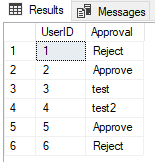 Our base data set we will use as an example.
Identify and resolve “Adding a value to a ‘date’ column caused an overflow”
This is similar to my other post on how to identify conversion problems, but here’s the catch, we don’t always get a “CASE WHEN” statement or “TRY-CONVERT / CAST” function to help us! This makes it a little bit tricky to identify your problem rows, but we’ll tackle that together.
Let’s create a basic table to illustrate the point. We’ll have an ID column so we can identify our rows easily and we’ll have another column holding our date value. But before we go too far into this setup, what would be an example where you would receive such an error?
Identify and resolve “Conversion failed when converting the varchar value ‘Something’ to data type int”
If you are seeing an error similar to “Conversion failed when converting the varchar value ‘something’ to data type int.”, I find the easiest method for identifying a solution to the problem is to analyze the data causing the error.
To illustrate how I identify bad data when making conversions, consider the environment setup below:
DECLARE @table TABLE (id VARCHAR(4));
INSERT INTO @table (id)
VALUES ('1' -- id - int
    )
     , ('NULL')
     , (NULL);
We have a simple table with a single column. The column type is a varchar(4) that allows NULL entries. We have inserted a 1, NULL, and the word “NULL”. Here’s what our table looks like:
Properly reference your columns!
 Wait, I should always what?!
If you don’t read the rest of this setup, I want you to take away one thing.
Always reference your tables with your columns when more than one table is involved in the query!
This post is made primarily with SQL Server in mind, but this behavior is actually ANSI SQL and can be replicated in PostgreSQL, MySQL, and Oracle.
ELI5 how are join statements semantically structured?
There are some folks just starting out to SQL Server, maybe they come from another flavor of database or perhaps they have no history with SQL at all. The terminology we use to talk about the work we do can get a little confusing, and I was lost when I began learning about schema structures. This is my “Explain it like I’m five – on how join statements are semantically structured.”. This is geared to new users who are in the first 1-6 months of learning SQL Server.
How to stop the SQL Scheduler with T-SQL
A user had a unique issue where their system would have dynamically changing job names and schedules, but they need to disable and re-enable them during maintenance. Obviously, this is a huge headache.
I made a recommendation that they should ultimately create a list of currently enabled jobs that had a schedule using a system query.
SELECT *
FROM MSDB.dbo.sysschedules ss
     INNER JOIN msdb.dbo.sysjobschedules jss
	 ON jss.schedule_id = ss.schedule_id
WHERE ss.enabled = 1;
The code above returns all schedules that are paired to a job that are enabled. The enabled = 1 flag and the inner join to the sysjobschedules table are what dictate those filters.
How to learn and implement Change Tracking in SQL Server
Why would you pick Change Tracking as a technology to use?
This allows you to detect changes in a lightweight manner via T-SQL functions to extract information about DML changes to Change Tracking enabled tables. Change Data Capture is more about auditing or creating a historical view utilizing the Transaction Log and Temporal Tables are the next step up from there which became available in 2016 versions of SQL Server. Change Tracking is primarily used for finding only things that have changed. Not necessarily why, how, or who changed it, but what has changed and what it is now.
How do I dynamically populate a dropdown list for users to filter a report in SSRS?
I was helping someone who had an interesting data set. Their tables were coming from a vendor and they had to report off of those tables. The problem was that the tables were all named and logically split by MMYYYY. This meant that if they wanted to query data between a date range, they would need to maintain views daily or get creative in SSRS.
Now this option can be used for many things, you just need to tweak the parameters a little. I’m showing you conceptually how to use the template to execute a dynamic SQL Script that populate a data set from a user selecting drop downs in a report. The parameters are tables that are named to match the date range of data contained within them in this example.
How to keep track of how many records were truncated?
Someone had an issue where a third party app would truncate a table for maintenance and they had no control over the truncate and when it happened. The issue was that they needed to know how many records were in the table before the truncate occurred.
Let’s start by understanding what DELETE and TRUNCATE are and how they work.
When you delete from a table, you are removing rows. You can specify what rows to delete with a
WHEREclause. When youTRUNCATEa table, it is not logging what rows are deleted and it does perform minimal logging.TRUNCATEis a great way to clear a table without causing the Transaction Logs to balloon.