There may be a time when you want to pass multiple values to a CASE WHEN expression. Here’s an example, take this simple data set below:
CREATE TABLE [Test]
([UserID]   INT,
 [Approval] VARCHAR(10)
);

INSERT INTO [Test]
VALUES
       (1,
        'Reject'),
       (2,
        'Approve'),
       (3,
        'test'),
       (4,
        'test2'),
       (5,
        'Approve'),
       (6,
        'Reject');

SELECT
       *
FROM [Test];
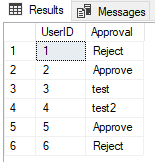 Our base data set we will use as an example.
Let’s say I wanted to pass a list of UserIDs to a stored procedure that is using a CASE WHEN statement to update our Test table. I want to update the column Approval and I want to set the statuses of to and to when I pass the [UserID] and [Approval] column to the stored procedure. If I pass a UserID and a value not or , it should be ignored.
This example shows us passing two columns with varied values to a stored procedure that will use these in a CASE WHEN statement. Let’s build out our test environment:
/************************
 Step (1)
 Reset test environment
************************/

IF OBJECT_ID('dbo.Test', 'U') IS NOT NULL
BEGIN
DROP TABLE [dbo].[Test];
END;
GO

IF OBJECT_ID('tvp_test', 'P') IS NOT NULL
BEGIN
DROP PROCEDURE
[tvp_test];
END;
GO

IF TYPE_ID('[dbo].[id_list]') IS NOT NULL
BEGIN
DROP TYPE
[dbo].[id_list];
END;
GO

/*********************
 Step (2)
 Creating test records
*********************/

CREATE TABLE [Test]
([UserID]   INT,
 [Approval] VARCHAR(10)
);

INSERT INTO [Test]
VALUES
       (1,
        'Reject'),
       (2,
        'Approve'),
       (3,
        'test'),
       (4,
        'test2'),
       (5,
        'Approve'),
       (6,
        'Reject');
Now here is where things get interesting. We are going to create a TABLE TYPE and a STORED PROCEDURE. We will later insert rows into our TABLE TYPE and the STORED PROCEDURE will be executed against our TABLE VALUED PARAMETER. If this concept is new or unfamiliar, I recommend the following readings:
MSDN on Table-Valued Parameters.
Nick Chammas presents an example using TVP’s on Stack Exchange.
/*********************************
 Step (3)
 This is our TYPE used for the TVP
*********************************/

CREATE TYPE [id_list] AS TABLE
([id]          INT,
 [approvaltwo] VARCHAR(10)
);
GO
With our type in place, let’s get our stored procedure in place that will update our table.
/************************************************
 Step (4)
 This is a procedure you would use to update data
************************************************/

CREATE PROCEDURE [dbo].[tvp_test](@customer_list [ID_LIST] READONLY)
AS
     BEGIN

--Update the table
         UPDATE [test]
           SET
               [Approval] = CASE
                                WHEN [approval] = 'Approve'
                                THEN 'Approved'
                                WHEN [approval] = 'Reject'
                                THEN 'Rejected'
/*********************************************************************************
 This line updates with what was there previously. Without the ELSE, it would null
             cells that are not 'Reject' or 'Approve'
*********************************************************************************/
                                ELSE [Approval]
                            END
         FROM [test] [t]
--Joining on TVP to filter rows that should be updated
         INNER JOIN @customer_list [cl] ON [t].[userid] = [cl].[id]
                                        AND [t].[approval] = [cl].[approvaltwo];
     END;
GO
Ok, here’s where we are now:
- We created/have our base table in place with records. We want to pass three UserIDs along with three approval statuses, only two should update.
- We have our table type which holds values similar to our base table.
- We have our stored procedure which joins our TVP and updates values in the CASE WHEN statement.
Let’s go ahead and pass those three UserIDs and three Approval statuses of (,,). We expect two rows to update even though we are passing three values and the table holds six values.
/******************************************************
 Step (5)
 Insert into the TVP, this is where you pass your array
******************************************************/

INSERT INTO @customer_list
(
       [id],
       [approvaltwo]
)
VALUES
       (1,
        'Reject'),
       (2,
        'Approve'),
       (3,
        'test');

/*********************************
Step (6)
 Execute against the TVP and table
*********************************/

EXECUTE [dbo].[tvp_test]
        @customer_list = @customer_list;
GO
Let’s compare the results to our original base data set.
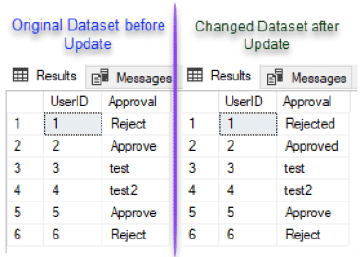
UserID 1 and 2 had their Approval status updated from Reject to Rejected and Approve to Approved while 3 was untouched as the value was passed and it did not fit the criteria. UserIDs 4,5,6 were also not updated because they were not passed through the TVP.
I hope this ability to pass arrays to stored procedures helps, cheers!
Comments
Leave a comment
Comments are reviewed before they appear, so yours will not show up straight away. Your email is optional, never published, and only used if a reply needs one.