If you are seeing an error similar to “Conversion failed when converting the varchar value ‘something’ to data type int.”, I find the easiest method for identifying a solution to the problem is to analyze the data causing the error.
To illustrate how I identify bad data when making conversions, consider the environment setup below:
DECLARE @table TABLE (id VARCHAR(4));
INSERT INTO @table (id)
VALUES ('1' -- id - int
    )
     , ('NULL')
     , (NULL);
We have a simple table with a single column. The column type is a varchar(4) that allows NULL entries. We have inserted a 1, NULL, and the word “NULL”. Here’s what our table looks like:
-- Step 1, see what the values look like.
SELECT *
FROM   @table;
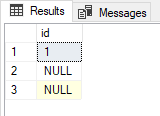
Your table and data set will probably be more complicated than our example table here. The methodology still remains true however to identifying our bad data. Let’s start by seeing the error our table produces.
-- Step 2, See how conversion errors out.
SELECT CAST(id AS INT)
FROM   @table;

Now to identify what is causing that problem, I’m going to use the TRY_CAST function wrapped in a CASE WHEN statement. I’ll persist this data set in memory with a CTE and then select the results filtered by the data sets giving me troubles.
-- Step 3, how do we find out what is causing the error?
; WITH cte AS (
	SELECT
		CASE WHEN
			TRY_CAST(id AS INT) IS NULL
			THEN id
			ELSE 'BadData'
		END AS result
	FROM @table
)
SELECT * FROM cte
WHERE result <> 'BadData';
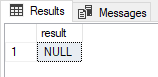
As we can see, it was the string “NULL” instead of the other NULL entry that was causing the conversion error. This is because the word “NULL” and a NULL entry are two very different things. I’m not going to dive too much into that in this post, but I do plan on discussing this topic later!
So what if I wanted to leave the bad data out of the equation and convert only the good data?
-- Step 4, convert only the good data.
; WITH cte AS (
	SELECT
		CASE WHEN
			TRY_CAST(id AS INT) IS NOT NULL
			THEN id
			ELSE 'BadData'
		END AS result
	FROM @table
)
SELECT
	cast(result as INT) as 'ConvertedValue'
FROM CTE
WHERE result <> 'BadData'
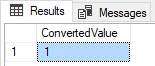
The idea here is that when the TRY_CAST value IS NOT NULL, then we display the ID value. We are reversing the CASE WHEN piece here to identify the good data now so we can easily filter out the bad data. This allows us to filter the results and perform a CAST on the values. A similar effect could be achieved by attaching the CASE WHEN statement to the subqueries WHERE clause and also adding the result for BadData filter, thereby negating the CTE. This can potentially cause a massive performance problem, so use with caution.
The reason for the need to have the CASE WHEN in the WHERE clause or utilizing a CTE (or some other method to hold a result set) is due to the logical order of operations performed by SQL. SQL evaluates the following clauses in this order:
- FROM
- WHERE
- GROUP BY
- HAVING
- SELECT
- ORDER BY
This means our query analyzes the WHERE clause first before the SELECT occurs. This means the below query would be invalid:
SELECT
CASE WHEN
			TRY_CAST(id AS INT) IS NOT NULL
			THEN id
			ELSE 'BadData'
		END AS result
FROM @table
WHERE result = 'BadData'
The column name and CASE WHEN function don’t even process before we begin to query the table variable and attempt a predicate filter on the column ‘result’. Here’s a valid example of filtering logic in the WHERE clause with a CASE WHEN.
SELECT
CASE WHEN
			TRY_CAST(id AS INT) IS NOT NULL
			THEN id
			ELSE 'BadData'
		END AS result
FROM @table
WHERE
'BadData' <> CASE
				WHEN
				 TRY_CAST(id AS INT) IS NOT NULL
				THEN id
			ELSE 'BadData'
		END
Again, this can have huge performance ramifications. In my experience, this generally can cause an index scan depending on your index setup. So as always, evaluate the situation and think critically about the route you want to take to solve the problem. Measure, tweak, record, compare, repeat.
Ideally, the best way to resolve the issue is to create constraints that force consistency and reliability in your data. The next best from there is going in and fixing your data sets periodically as issues appear.
I have added in a form for feedback, it would be very helpful if you would take a few minutes to fill this out. My goal is to adjust the content to best help others resolve their problems.
Thank you for your response. ✨
Name (Optional)
Email (Optional)
Did this solve your problem?(required)
Yes
No
Kind of
Were you able to eventually solve your problem? If so, how?(required)
Were you able to solve your problem with a different resource? If so, what was the resource?(required)
How can I improve this post to help you or others better in the future?
__
Send FeedbackSubmitting form
Δ
Comments
Leave a comment
Comments are reviewed before they appear, so yours will not show up straight away. Your email is optional, never published, and only used if a reply needs one.